TCP TIME_WAIT on Linux: When Closed Connections Become a Bottleneck

Consider a gateway that opens a fresh upstream connection for every request. Its file-descriptor count looks healthy, but ss shows thousands of sockets in TIME_WAIT. Under heavier load, some outbound connections fail with Cannot assign requested address.
That combination is possible because three resources have different lifetimes: the application’s file descriptor, the TCP connection state, and the address-and-port combination available for the next connection.
TIME_WAIT is normal TCP cleanup. It becomes an operational problem when connection churn exhausts a constrained resource or creates measurable kernel overhead. The count alone does not tell you which is happening.
This article uses Linux 6.10 as its source baseline and follows ordinary FIN/ACK shutdown. Resets and simultaneous close take different paths. The gateway above is an illustrative scenario, not a benchmark result.
What survives close()?
close(fd) removes that descriptor from the process’s descriptor table. The integer can then be assigned to another open file. Closing one descriptor does not necessarily initiate TCP shutdown: another reference created through dup(), fork(), or descriptor passing may still keep the socket open. See close(2).
Once the final reference is released, the kernel can continue closing the connection after the application has lost access to it. A successful close() does not establish that the peer application processed the request; that requires an application-level response or acknowledgment.
On the normal TIME_WAIT path, Linux’s tcp_time_wait() preserves the necessary protocol information in a smaller tcp_timewait_sock: addresses, ports, sequence-number state, timestamps, and timer/lookup bookkeeping. The full socket can be torn down while this object remains.
This retained state consumes kernel memory, but it does not hold a process file descriptor. Raising ulimit -n therefore does not release TIME_WAIT entries or expand the outbound port pool.
Follow the FIN, not the client/server label
In an ordinary close, the endpoint that sends the first FIN goes through FIN_WAIT_1 and FIN_WAIT_2. When it receives the peer’s FIN, it sends the final ACK and enters TIME_WAIT. The peer finishes through LAST_ACK and CLOSED.
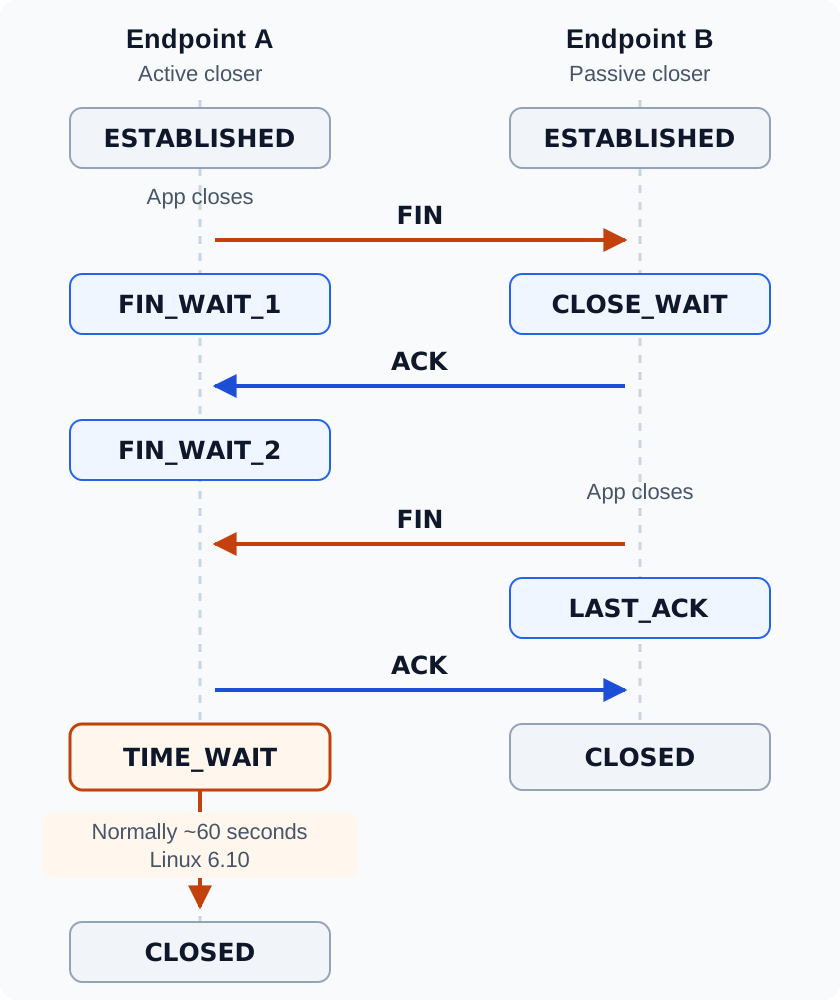
A normal, non-simultaneous close, with ACK and FIN shown separately. Either endpoint can be a client or a server. Open the diagram for the full-size view.
Two requirements explain the retained state:
- If the final ACK is lost, the peer can retransmit its FIN. The endpoint in TIME_WAIT can acknowledge it again.
- Delayed segments from the old connection must not be mistaken for data belonging to a new connection with the same four-tuple: source IP, source port, destination IP, destination port.
RFC 9293, section 3.6 specifies a wait of twice the maximum segment lifetime, while permitting earlier reopening under defined conditions. Simultaneous close can leave both endpoints in TIME_WAIT.
For a proxy, inspect the downstream and upstream legs separately. The proxy might receive the first FIN on one leg and send it on the other. A label such as “server” cannot tell you where the waiting state will accumulate.
Where Linux gets the 60 seconds
Linux 6.10 defines the normal interval in include/net/tcp.h:
#define TCP_TIMEWAIT_LEN (60*HZ)HZ expresses kernel ticks per second, so this represents 60 seconds. In tcp_time_wait(), entering TCP_TIME_WAIT selects this interval before scheduling the timer.
It is an implementation choice, not a duration inferred from the connection’s measured RTT. It also does not mean an entry must disappear exactly 60 seconds after you first observe it: the timer may already be partway through, incoming packets can cause rescheduling, and eligible reuse or exceptional cleanup can remove state sooner. The Linux 6.10 TIME_WAIT implementation contains these paths.
There is no ordinary Linux 6.10 sysctl that simply changes this constant to ten seconds. In particular, tcp_fin_timeout controls the lifetime of an orphaned FIN_WAIT_2 connection. Its similar default value does not make it the TIME_WAIT timer. See the versioned IP sysctl documentation.
Count connection turnover, then count ports
As a first approximation, a steady flow of 1,000 connections entering TIME_WAIT each second, each remaining for 60 seconds, produces about 60,000 entries:
TIME_WAIT population ≈ entries per second × average residence timeThis is a steady-state estimate. Bursts, reuse, and timer changes affect it. A large population can be the expected result of a busy service rather than evidence of a leak.
The capacity question is more specific: how many distinct connections can this source establish to this destination?
Suppose the gateway uses one source IP and connects to one upstream IP and port. It actively closes every connection, holds each four-tuple in TIME_WAIT for 60 seconds, and cannot reuse it early. If its configured ephemeral range is 32768–60999, there are 28,232 candidate ports before reservations and other use.
Ignoring the connection’s active lifetime, the simplified ceiling is:
28,232 ports / 60 seconds ≈ 470 new connections per secondThat is a worked capacity example, not a Linux-wide connection limit or measured throughput. Established connections also occupy tuples, so the real budget is smaller under these assumptions. Different destination tuples can share a local port; multiple source addresses, explicit binding, and reuse policies change the calculation.
For an automatically bound Internet socket, connect(2) documents EADDRNOTAVAIL when the ephemeral port range is exhausted. Correlate that error with the source/destination distribution before blaming TIME_WAIT. It is not an exclusive diagnosis for every occurrence of that error.
On the listening side, thousands of TIME_WAIT entries whose local port is 443 do not each consume an exclusive copy of port 443. The remote address and port distinguish the connections. A listener’s accept-queue capacity is a separate question.
A diagnosis that leads to a decision
Run socket inspection in the application’s network namespace. Host and container views can differ, and a NAT gateway has its own connection-tracking and port constraints.
Start with population and timers:
ss -s
ss -tan -o state time-wait
Then narrow the view to the upstream under investigation. Replace this documentation address with the actual destination:
ss -tan -o state time-wait '( dst 192.0.2.10 and dport = :443 )'The ss(8) manual documents state filters, address filters, and the -o timer output. Compare several samples alongside new-connection rate, request rate, errors, and latency. If the closing side is unclear, a packet trace of the FIN exchange settles it.
Read the actual port configuration:
sysctl net.ipv4.ip_local_port_range
sysctl net.ipv4.ip_local_reserved_ports
sysctl net.ipv4.tcp_tw_reuse
Use those values in the estimate rather than assuming your distribution has a particular default. For kernel memory, inspect the TIME_WAIT slab caches where available:
sudo awk '/^tw_sock_TCP/ {print}' /proc/slabinfoslabinfo(5) explains the object and slab fields. Object size varies with the build and architecture, and allocated slab memory includes spare capacity. This is kernel allocation data, not the gateway’s RSS; visibility may also differ from the socket namespace you inspected.
| Observation | Next investigation |
|---|---|
| TIME_WAIT rises with traffic; errors and latency stay healthy | Check whether the population matches connection turnover and retained memory is acceptable. |
Outbound EADDRNOTAVAIL concentrates on a small set of destinations |
Inspect source-port capacity, active connections, and why the upstream pool is not reusing connections. |
EMFILE or a rising process fd count |
Investigate open descriptors separately; TIME_WAIT state does not hold them. |
Many CLOSE_WAIT sockets |
Find why the application has not finished its side of shutdown after receiving the peer’s FIN. |
| Timeouts without local port exhaustion | Check listener queues, packet loss, routing, and any intervening NAT before changing TCP timers. |
This table is a way to choose the next measurement. Several failure modes can coexist.
Fix the connection lifecycle first
In the gateway example, a request should usually borrow an upstream connection and return it to a pool. Creating one connection per request ties request throughput directly to handshake cost and port turnover.
For Go, retain a shared http.Transport and http.Client. A long-lived client already provides pooling with the default transport; customize capacity only when the workload calls for it:
// Initialize once and reuse across requests.
transport := http.DefaultTransport.(*http.Transport).Clone()
transport.MaxIdleConns = 256
transport.MaxIdleConnsPerHost = 64

client := &http.Client{
    Transport: transport,
    Timeout:   5 * time.Second,
}
These are example capacities, not a tuning prescription. Close response bodies promptly. For HTTP/1.x, reading the body to EOF and closing it makes the connection eligible for reuse; abandoning a response may prevent reuse. Apply normal response-size and timeout limits when consuming bodies. MaxIdleConnsPerHost limits idle connections, while MaxConnsPerHost controls total connections per host. See net/http.
For an Nginx upstream, an explicit HTTP/1.1 pooling configuration can look like this, inside the http context:
upstream app_backend {
    server 192.0.2.10:8080;
    keepalive 64;
}

server {
    listen 8080;

    location / {
        proxy_pass http://app_backend;
        proxy_http_version 1.1;
        proxy_set_header Connection "";
    }
}
The upstream keepalive value is an idle-cache limit per worker, not a cap on all upstream connections. Explicit settings also make the intended behavior clear across Nginx versions with different defaults. HTTP connection reuse and TCP keepalive probes are separate mechanisms: probes do not turn per-request connections into a reusable pool.
After the change, look for fewer new TCP connections per completed request, stable error rates, and acceptable latency. TIME_WAIT should decline as existing entries age out, but a lower count is only useful if the service is actually healthier.
What the tempting fixes actually change
Once measurements establish a remaining capacity problem, evaluate changes against that specific constraint:
| Setting or technique | What it changes |
|---|---|
ip_local_port_range |
Expands the automatically allocated local-port range; account for reservations and deployment constraints. |
tcp_tw_reuse |
Allows eligible TIME_WAIT reuse. Linux 6.10 documents 0 as disabled, 1 as global, and the default 2 as loopback-only. It is not a global timer reduction. |
tcp_max_tw_buckets |
Limits retained TIME_WAIT objects. Lowering it discards protocol state; it does not fix connection churn. |
Those semantics come from the Linux 6.10 sysctl documentation. A loopback load test with default reuse enabled can therefore behave differently from a remote-upstream workload.
Do not resurrect tcp_tw_recycle from an old tuning guide. The tcp(7) manual records its availability only through Linux 4.11 and explains the timestamp assumptions that made it troublesome with NAT.
Likewise, enabling SO_LINGER with a zero interval requests an abortive close. Linux’s tcp_close() takes a disconnect/reset path, potentially discarding queued data. That is a change to delivery behavior, not a free performance improvement.
A useful investigation ends with an explanation of the workload: which endpoint closes, how frequently new connections are created, where the tuples concentrate, and which resource fails. Once those are known, TIME_WAIT stops being a mysterious wall of socket entries and becomes a measurable part of the connection lifecycle.
Related articles

What Does TCP listen() Backlog Actually Control on Linux?
Does listen() backlog control the SYN queue or accept queue? Trace Linux 6.10 behavior through somaxconn, SYN cookies, …

What Happens to Your Data During a Linux read()? DMA, Page Cache, and CPU Copies
Follow a Linux buffered file read from storage to the page cache and user buffer. See what DMA handles, why the CPU …

False Sharing: Why Unrelated Writes Slow Each Other Down
Two threads updating separate variables can still slow each other down when both land on the same cache line. See why …