What Happens to Your Data During a Linux read()? DMA, Page Cache, and CPU Copies
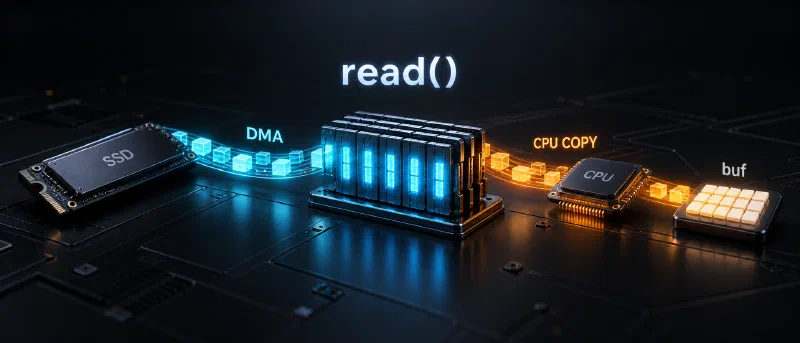
Reading part of a file takes two lines of C:
char buf[4096];
ssize_t n = read(fd, buf, sizeof(buf));
When n > 0, the application can process the first n bytes of buf. But who brought those bytes into memory? Did the CPU execute instructions to fetch them from the storage device, or did the device move them itself?
For an ordinary buffered file read on Linux, the storage device typically uses DMA to fill the kernel’s page cache when the required data is missing. The CPU then copies the requested bytes into the application’s buffer. A page-cache hit skips the storage transfer for those bytes.
That division explains why a machine can have DMA-capable storage and still spend considerable CPU time reading files. Moving the payload from the device is only one part of the work.
This article follows buffered I/O for a regular file on a conventional local, block-backed file system. Direct I/O, DAX, memory-backed files, and network file systems have different paths. The source links use Linux 6.10 as a fixed reference.
A read starts with the page cache
The file descriptor identifies an open file. For a buffered read, the kernel uses the file and requested offset to look for the corresponding content in the page cache: file data retained in host memory so later accesses can reuse it.
Two cases determine the main payload path:
| State of the requested file data | Storage device’s work | CPU’s payload work |
|---|---|---|
| Already cached and ready to read | No storage transfer needed for these bytes | Copy from the page cache to buf |
| Missing and requiring a device read | Typically DMA into pages used by the page cache | Copy the requested bytes to buf once ready |
A cache hit therefore turns a file read largely into an in-memory operation. The application still makes a system call, and the kernel still checks and manages the request, but the payload does not have to come back from the SSD.
On a miss, the kernel obtains cache pages and arranges the underlying I/O. Once the required content is available, it can perform the copy into user space. Linux’s generic buffered-read machinery lives in mm/filemap.c.
One read() can span both cases. Some pages may already be ready, others may be undergoing I/O, and still others may need a new request. Readahead can also fetch more data than this call asks for. A system call, a cache page, and a device request are different units of work. There is no fixed one-to-one correspondence between them.
The return value is another boundary worth keeping: read() may return fewer bytes than requested. The application must process the returned length, rather than assume all 4,096 bytes were filled. See read(2).
How the device moves data without a CPU copy
With programmed I/O, the CPU executes the operations that transfer payload data through the device’s interface. For example, it can read from a controller’s data port and store the result in memory. Software might poll for readiness or receive an interrupt first; either way, CPU instructions perform the payload transfer.
Direct memory access (DMA) lets hardware perform the transfer between the device and host memory. A typical PCIe storage controller can issue memory transactions after the driver has arranged the request.
For a storage read, the process is roughly:
- Prepare the destination. The kernel obtains suitable memory, and the driver uses the DMA API to establish addresses the device can access.
- Submit the command. The driver describes the logical blocks to read, the transfer length, and the destination buffers. With NVMe, it normally places a command in a submission queue and notifies the controller through a doorbell mechanism.
- Transfer the payload. The controller retrieves the requested content and DMA-writes it into the host buffers. A thread waiting for the I/O can sleep while the CPU runs other work.
- Process completion. The driver handles the completion status, and the kernel makes the data available to waiting readers. Interrupts commonly prompt this processing; some I/O paths use polling.
The NVMe queue submission, DMA mapping, and completion code can be followed in the Linux 6.10 PCI driver.
The address passed to the device is a DMA address. It cannot generally be obtained by casting a CPU pointer: CPU virtual addresses and device-visible addresses belong to different address spaces. An IOMMU may translate the device’s address to the underlying physical memory. The Linux DMA mapping guide explains this distinction and the driver’s mapping responsibilities.
Once the transfer is arranged, the CPU does not have to execute a load and store for each portion of the file payload arriving from storage. It still executes the code that submits, tracks, and completes the request.
Why reading still consumes CPU and memory bandwidth
DMA removes a particular payload-transfer task from the CPU. Three other costs remain.
Request management
The kernel has to look up file data, manage cache pages, and, when necessary, resolve file offsets to device blocks. The file system, block layer, and driver organize requests and submit them to the controller.
Completion requires more CPU work: checking results, performing any required DMA unmapping or synchronization, updating page state, and waking waiters. Small, frequent requests can make this per-request overhead significant even when the device moves every payload byte.
The system-call boundary adds its own work. Entering the kernel does not by itself mean the scheduler changes threads; blocking for I/O can cause a separate scheduling event. What happens during a Linux system call covers that distinction.
Copying and processing the result
The page cache and the application’s buf are normally different memory regions. The buffered-read path must put the result in the destination supplied by the caller.
Conceptually, that step looks like this:
/* Conceptual payload copy, not the complete file-read implementation. */
copy_to_user(buf, cached_data, bytes_to_copy);
The actual implementation uses page and iterator helpers, but the relevant work is a CPU-executed memory copy. It may use bulk copy instructions or optimized loads and stores; it is not necessarily a byte-at-a-time loop.
Afterward, the application may parse, decompress, validate, or copy the result again. A fast storage transfer does nothing to eliminate those operations. On a warm-cache workload, they can dominate while the storage device has little to do.
Shared hardware resources
DMA traffic still travels through the device link and the host memory system. High-throughput I/O uses interconnect, cache, or memory bandwidth and can compete with CPU memory accesses.
The effect depends on memory channels, device placement, NUMA topology, and concurrent work. An SSD’s advertised transfer rate alone cannot tell you whether the machine’s memory system is saturated.
Likewise, saying that DMA writes to a host-memory buffer does not require every byte to land in DRAM before the CPU can see it. The platform’s cache and I/O architecture determine the physical path. For this discussion, the useful distinction is who performs the transfer and which software buffer receives the data.
If DMA already exists, what does zero-copy save?
Consider a server that reads a file only to send it unchanged over a socket. With ordinary read()+write(), the typical cold-cache payload path has four stages:
| Stage | Data movement | Performed by |
|---|---|---|
| 1 | Storage to the page cache | Storage controller using DMA |
| 2 | Page cache to the application buffer | CPU |
| 3 | Application buffer to the kernel socket send path | CPU |
| 4 | Host buffers to the network device | NIC using DMA |
The two middle copies exist because the payload passes through user space. If the application does not modify it, a supported sendfile() path can let the output side reference existing file pages and let the NIC read those pages directly.
DMA handles device-to-host or host-to-device transfers. Zero-copy interfaces reduce intermediate payload copies between software buffers. Both can contribute to the same transfer.
The achievable path still depends on the file system, protocol stack, device capabilities, and any processing the content requires. Which copies sendfile() actually removes explains those conditions in detail.
If the application needs to inspect the file itself, mmap() offers another option: access file pages through a mapping in the process’s address space. This can avoid copying them into a separate read() buffer, while introducing page-fault and mapping-management costs. The mmap() versus read() comparison examines how access patterns change that trade-off.
Turn the data path into a performance investigation
The practical question is where the workload spends its time. Start by separating waiting for storage from handling data already in memory.
Compare initial and repeated reads
Keep the file, request sizes, access pattern, and application processing consistent. Compare an initial pass with repeated passes, recording elapsed time, CPU usage, and device activity.
A first pass is not necessarily cold: another process or an earlier operation may have populated the cache. Repeated passes are not necessarily warm either, especially when the working set exceeds available memory. Observe the device rather than assign cache states from the run number.
When requests wait, correlate application latency with device throughput, queueing, and latency from tools such as iostat -x. CPU iowait is only a supporting clue: the /proc/stat documentation explains why it is not a reliable standalone measure of storage waiting.
Identify what the CPU is doing
Use perf call stacks and hot functions to separate request handling, memory copying, protocol work, and application processing. Then choose an experiment that targets the observed cost:
| Observed cost | Useful experiment |
|---|---|
| Many small requests with substantial fixed overhead | Increase read size or batch work where latency requirements allow |
| Copies while forwarding unchanged file content | Evaluate sendfile() on the actual serving path |
| Copies before direct access to file contents | Compare read() with mmap() using the application’s access pattern |
| Parsing, decompression, or validation | Optimize that processing and measure the whole request again |
| Suspected memory-bandwidth pressure | Check platform bandwidth counters, cache behavior, and NUMA placement |
A drop in instructions per cycle can suggest a change in execution efficiency, but it does not identify memory-bandwidth saturation by itself. Combine it with the profile and relevant hardware counters.
Follow copies beyond the system call
An application can save one kernel copy and then duplicate the same payload several times between its own modules: into a temporary buffer, into an assembled message, and into a new allocation for the next stage.
Check whether the underlying bytes actually move. Creating a view, slice, or wrapper may leave them in place; the behavior depends on the language and API.
Where sharing is appropriate, define who owns the buffer and how long it remains valid. Where a consumer needs an independent lifetime or must modify its data, a copy can be the correct choice. Removing it without preserving those guarantees merely trades bandwidth for a correctness problem.
For the next slow file read you investigate, follow the bytes through each stage: storage transfer, page-cache access, user-buffer copy, and application processing. The useful optimization is the one that reduces the measured cost at the stage doing the work.
Related articles
False Sharing: Why Unrelated Writes Slow Each Other Down
Two threads updating separate variables can still slow each other down when both land on the same cache line. See why …

Why Locking a Mutex Usually Doesn't Need a System Call
An uncontended pthread_mutex_lock() usually runs a few user-space atomic instructions and never enters the kernel. …
sendfile() Promises Zero-Copy. Which Copies Does It Actually Remove?
sendfile() is marketed as zero-copy, but data still moves. See which two CPU copies the read()+write() path really …