Stacknote: How I Turned My Hugo Blog into an Open-Source Theme
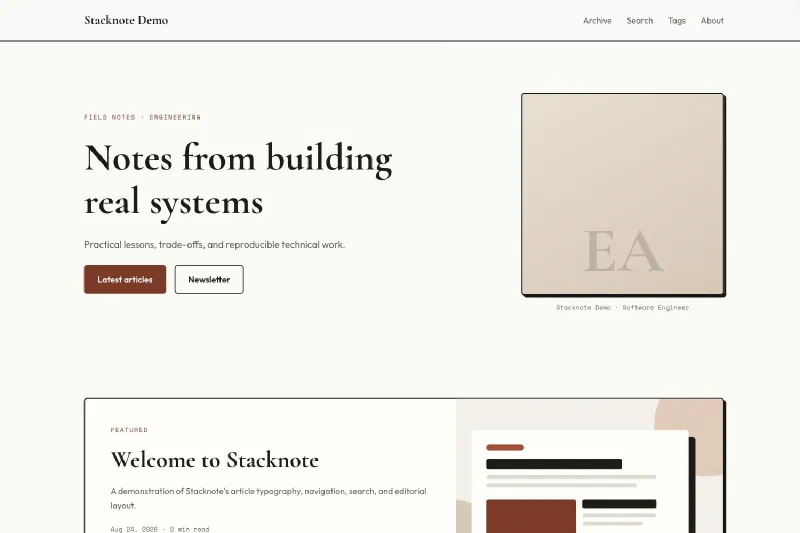
Stacknote is the open-source Hugo theme behind this site. It brings together the pieces I use for publishing technical articles: a readable article layout, code blocks with copy buttons, responsive cover images, an archive, and search that runs in the browser.
The theme grew out of wanglong.cv. Extracting it into its own repository meant separating my name, content, and site configuration from the layouts and behavior another writer could reuse. That boundary is the most useful part of the project to explain.
You can explore the standalone demo, get the source code and installation reference, or find Stacknote in the Hugo Themes directory. The code is available under the MIT license.
A technical blog with an editorial feel
My articles tend to contain code, diagrams, and detailed explanations of how systems work. The layout needs to give those elements enough room while making long pages easy to navigate.
Stacknote uses an off-white background, clay-colored accents, serif display headings, and cards with visible borders and hard shadows. Cormorant Garamond gives the headings their character; Outfit handles body text, and Space Mono handles code and small metadata. The homepage introduces the author and leads into the articles, with optional sections for topics, an author introduction, and subscriptions.
On smaller screens, the homepage becomes a single column and navigation moves into a menu. Inside articles, the theme includes a table of contents, previous and next links, and related articles. Wide tables can scroll horizontally, code blocks have copy controls, and print styles provide a separate reading format.

The same homepage at a mobile viewport.
The accessibility work includes a skip link, visible keyboard focus, navigation labels, and reduced-motion support. Those are concrete behaviors in the theme; they are also things I need to preserve as the design changes.
Drawing the boundary between a site and a theme
A personal site can assume its author’s name, preferred content directory, and navigation. A reusable theme needs to make those assumptions explicit.
In Stacknote, the site owns its Markdown, images, menus, analytics configuration, and author information. The theme owns the templates, styles, scripts, and default interface strings. The repository reflects that split:
hugo-theme-stacknote/
├── assets/
│   ├── css/
│   └── js/
├── layouts/
├── i18n/
├── static/
├── exampleSite/
├── hugo.toml
└── theme.toml
For example, the content section defaults to articles, but params.mainSection lets another site use a different section. Author details and homepage copy live in configuration. Homepage sections can be disabled independently. When no newsletter URL is configured, the subscription card points to RSS.
The exampleSite directory gives those choices a separate place to run. It contains a working configuration, placeholder articles, utility pages, and sample images. It also serves as the build fixture for CI. A change that only works with my personal site’s content is not enough.
My own blog now consumes Stacknote as a Git submodule. The parent repository records a specific theme revision, so updating the theme is an explicit change that I can build and review before deploying the site.
Three implementation choices worth explaining
Let Hugo handle the asset pipeline
Stacknote uses Hugo Pipes to minify and fingerprint its CSS and JavaScript, with integrity attributes on the generated asset references. There is no npm build step for the theme.
Local cover images go through Hugo’s image processing. The current implementation produces 480, 800, and 1200 pixel WebP variants and exposes them through responsive image markup. That lets the browser choose an appropriate source for its viewport and display density.
There is an authoring requirement behind that feature: local covers must live under the site’s assets/ directory. Files placed only in static/ do not go through this pipeline. Remote cover URLs are supported, but they are rendered directly without local resizing or conversion.
Keep search inside the static site
Hugo generates a JSON index containing article titles, URLs, dates, tags, summaries, and searchable text. The search page fetches that index and scores matches in JavaScript, giving titles and tags more weight than article text. It supports fuzzy matching and displays loading, empty, failure, and retry states.
This keeps search deployable alongside the rest of the static site, with no search service to operate. The trade-off is that the browser downloads the index and does the matching. As an archive grows, index size and query time become things to measure.
Search also has two explicit setup requirements: the home page must generate a JSON output, and the site must contain a page with layout: search. The installation example below includes both.
Generate metadata alongside the page
The theme generates canonical links, Open Graph and Twitter Card metadata, and JSON-LD for articles, the author profile, and the website. Paginated lists have their own canonical URLs. Search pages are marked noindex, and a configurable article-count threshold controls indexing and discovery of sparse tag pages.
These defaults cover recurring publishing tasks. Authors still need to provide accurate titles, useful descriptions, image alt text, and content worth reading. A template cannot do that part for them.
Try Stacknote on a new site
The current theme declares Hugo Extended 0.160.0 or newer as its minimum requirement. Check your installation first:
hugo versionThe output should include extended.
Create a site and add Stacknote as a submodule:
hugo new site my-notes --format yaml
cd my-notes
git init
git submodule add https://github.com/myimilo/hugo-theme-stacknote.git themes/stacknote
For this new site, replace the generated hugo.yaml with the configuration below. If you are adding Stacknote to an existing site, merge the relevant settings into your configuration instead.
baseURL: https://example.com/
title: My Engineering Notes
theme: stacknote
locale: en-US
enableRobotsTXT: true

taxonomies:
  tag: tags

outputs:
  home: [HTML, RSS, JSON]

params:
  author: Your Name
  authorInitials: YN
  role: Software Engineer
  description: Practical notes about software and systems.
  homeEyebrow: FIELD NOTES · ENGINEERING
  homeTitle: Notes from building real systems
  homeIntro: What I learn while building and operating software.
  mainSection: articles
  showToc: true
  showTopics: true
  showAbout: false
  showNewsletter: true

menu:
  main:
    - name: Archive
      url: /archives/
      weight: 10
    - name: Search
      url: /search/
      weight: 20
    - name: Tags
      url: /tags/
      weight: 30
Create the following content files:
content/
├── archives.md
├── search.md
└── articles/
    ├── _index.md
    └── first-post.md
Use this front matter in content/articles/_index.md:
---
title: Articles
---
In content/archives.md:
---
title: Archive
layout: archives
---
In content/search.md:
---
title: Search
layout: search
sitemap:
  disable: true
---
Then write content/articles/first-post.md:
---
title: "What I Learned Building My First Service"
date: 2026-09-08
description: "A few practical lessons from taking a small service into production."
tags: [Engineering]
---

This is where the article begins.

## The first useful lesson

Describe a concrete problem, what you tried, and what happened.
Start the local preview:
hugo serverOpen the address printed by Hugo. You should have an article on the homepage, an archive, and a search page. Try searching for a phrase from the article body to check that the JSON index is working.
To add a cover, put an image at assets/images/first-post.png and add this to the article’s front matter:
cover:
  image: images/first-post.png
  alt: A diagram showing the service and its dependencies.
Before deploying, replace baseURL with your actual site URL and run a production build:
hugo --panicOnWarning --minifyThe README covers the remaining options, including author pages, social images, newsletter links, and related configuration. The included exampleSite is useful if you prefer starting from a fully populated reference.
Customization and current limits
Use configuration for the homepage text, author details, menus, and optional sections. For deeper changes, place an override at the same relative path in your site. For example, a site-level layouts/partials/footer.html replaces the theme’s footer partial. Keeping overrides in the site makes it easier to update the installed theme.
There are a few boundaries to know before adopting Stacknote:
- Fonts load from Google Fonts. System fallbacks are present, but blocked font requests change the appearance. Self-hosting currently requires template and CSS overrides.
- Interface translations are English-only today. The strings live in Hugo’s i18n layer, providing a place to add other languages.
- Local covers use global Assets. Put them under
assets/; the current cover lookup does not resolve images stored beside an article in a Page Bundle. - Search fetches the article index. Very large archives deserve testing with representative content.
The repository’s CI builds the reference site with both the minimum supported Hugo version and the latest release, using strict warning handling and minification. This catches build regressions. Browser interactions and visual behavior still need their own checks.
What I want to learn from other users
The next useful feedback is about the whole writing workflow: installing the theme, changing the homepage, publishing an article, adding images, and updating to another revision.
If you try Stacknote, I would like to know where that process becomes unclear. A missing configuration example or an awkward image path is worth fixing. You can open an issue in the repository with your Hugo version, the relevant configuration, and a small example that reproduces the problem.
Stacknote continues to run this blog. That gives me a place to use each change in everyday publishing, while the separate demo keeps the theme usable beyond my own site.